
Moonstack Ultimate Elementor Kit – Complete Guide to Dynamic Sliders, Blog Layouts & Form Builder
rsbloggers • April 27, 2026
Introduction
Designing a modern WordPress website often requires more than just basic layouts. While Elementor makes page building easy, you still need the right tools to create dynamic sections like sliders, blog layouts, and reusable templates.
That’s where Moonstack Ultimate Elementor Kit comes in.
This plugin is built to extend Elementor with practical widgets that actually solve real design problems — whether you’re building a blog, business website, or landing page. Instead of relying on multiple plugins, it gives you everything in one place.
What Makes This Plugin Different?
Most Elementor add-ons overload you with unnecessary widgets. This plugin focuses on what developers and designers actually use:
- Sliders that are flexible (not rigid)
- Dynamic post layouts (not static blocks)
- Reusable templates (to save time)
- Simple form creation with submission handling
It feels less like a “widget pack” and more like a toolkit.
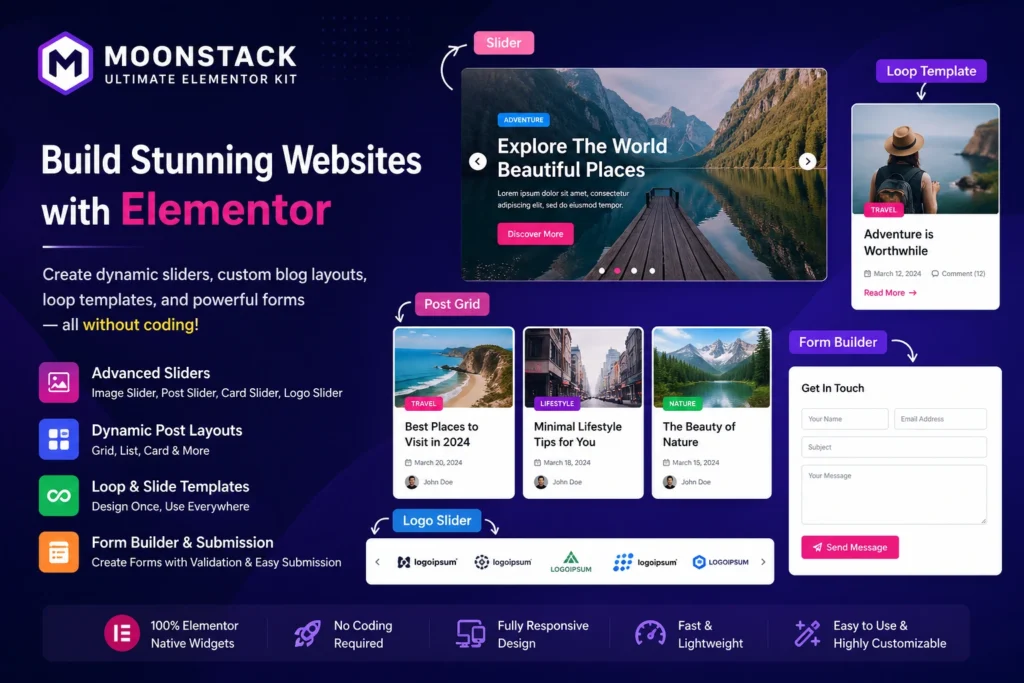
Advanced Slider System (Image, Logo, Card & Post Sliders Explained)
Sliders are one of the core strengths of this plugin.
You’re not limited to just image sliders. You can create:
- Card sliders for blog posts or services
- Logo sliders for client or partner sections
- Post sliders that automatically pull content
- Custom-designed slides using Elementor
The best part? You can design each slide the way you want — not the way the plugin forces you to.
This makes it ideal for:
- Homepage hero sections
- Featured blog content
- Brand showcases
How to Build Fully Custom Blog Layouts in Elementor
If you’ve ever felt that default WordPress blog pages look outdated, this plugin fixes that.
Instead of being stuck with a standard list layout, you can:
- Create grid-based blog designs
- Design card-style posts
- Show dynamic data like author, date, category
- Control spacing, typography, and layout
You’re essentially designing your blog like a custom UI — not just displaying posts.
Loop Templates – Create Once, Use Across Entire Website
Loop templates are a huge time-saver.
Instead of designing every section again and again, you:
- Create a single post/card design
- Save it as a loop template
- Apply it across multiple sections
Need to update the design later? Just edit the template once — changes apply everywhere.
This is especially useful for:
- Blog archives
- Category pages
Featured sections
Slider Slide Templates – Complete Design Control for Each Slide
This feature takes sliders to another level.
Instead of editing slides inside a small settings panel, you can:
- Design slides using Elementor editor
- Add dynamic content inside slides
- Reuse slide layouts across different sliders
So whether you’re creating a testimonial slider or a featured posts carousel, your design remains consistent and flexible.
Elementor Form Builder with Submission & Validation
Forms are another important part of any website — and this plugin handles that too.
You can:
- Create custom forms with different field types
- Add validation (required fields, formats, etc.)
- Handle form submissions easily
Use cases include:
- Contact forms
- Inquiry forms
- Lead capture forms
- Simple registration forms
It’s straightforward and doesn’t feel bloated.
Real-World Use Cases of Moonstack Ultimate Elementor Kit
This plugin fits naturally into many types of projects:
- Blog Websites – Create modern, card-based blog layouts
- Agency Sites – Showcase services and clients using sliders
- Portfolio Sites – Highlight work using custom grids and sliders
- Business Websites – Combine forms + dynamic content
Landing Pages – Build high-converting sections
Performance, Speed & Ease of Use
One of the underrated aspects is usability.
- Clean interface
- Works directly inside Elementor
- No steep learning curve
- Doesn’t slow down your workflow
It’s built for people who actually design websites daily.
Pros and Cons of the Plugin
Pros
- Flexible slider system
- Dynamic post integration
- Reusable loop templates
- Clean and practical widgets
No coding required
Cons
- Requires Elementor (not standalone)
- Beginners may need some time to explore all features
Final Review – Is This Plugin Worth It?
Moonstack Ultimate Elementor Kit is not just another Elementor addon — it’s a practical toolkit for building real-world websites.
If you want better control over blog design, sliders, and reusable layouts without touching code, this plugin is a solid choice.
It simplifies complex tasks while still giving you creative freedom — which is exactly what most Elementor users are looking for.
Frequently Asked Questions (FAQs)
What is Moonstack Ultimate Elementor Kit?
Moonstack Ultimate Elementor Kit is an Elementor addon plugin that provides advanced widgets like sliders, dynamic post layouts, loop templates, and form builders to design modern websites without coding.
Do I need Elementor to use this plugin?
Yes, this plugin works only with Elementor. It extends Elementor’s functionality, so Elementor must be installed and activated.
Can I create a blog using this plugin?
Yes, you can create fully custom blog layouts using dynamic post widgets, grids, and loop templates. However, you still need to create posts in WordPress — the plugin helps you design how they appear.
What types of sliders are included?
The plugin includes multiple slider types such as:
- Image Slider
- Card Slider
- Logo Slider
- Post Slider
You can also create custom slide templates using Elementor.
What is a loop template in Elementor?
A loop template is a reusable design layout for posts or items. You design it once and apply it across multiple sections like blog pages, category archives, or sliders.
Can I create forms with this plugin?
Yes, the plugin includes a form builder where you can create contact forms, lead forms, and simple registration forms with validation and submission handling.
Is coding required to use this plugin?
No, everything is built using drag-and-drop inside Elementor. You can design sliders, layouts, and forms without writing any code.
Is this plugin suitable for beginners?
Yes, but beginners may need some time to explore all features. Once you understand sliders and loop templates, it becomes easy to use.
Can I use it for client or business websites?
Absolutely. It’s ideal for:
- Agency websites
- Business sites
- Portfolio projects
- Blogging platforms
Does it support dynamic content?
Yes, you can display dynamic data like post titles, images, categories, and custom fields (ACF) using this plugin.